Softr Databases and Workflows - Overview
You want to build an application quickly to validate your market. Or to make a small and professional internal tool for your team/partners. Softr is a good option for those cases, because it allows building apps “quickly” (relatively so), all in one place, with a high degree of customization. All the technical formalities (e.g., authentication, user caching) that you would have to figure out and implement when building an app from scratch are abstracted away and handled natively by Softr.
You can focus solely on connecting your data and building the interface (app) according to your requirements. This compresses the development lifecycle significantly, which is valuable if you are in the early stages of your business or you are well-established but don’t want to fall into the stereotype that incumbents are slow and lack innovation.
To be clear, this doesn’t mean that building a (well-made) Softr app is easy and anyone can do it in a few hours. The complexity depends on the app’s requirements and how easily you can learn and apply a new software tool. Traditional app development skills—design, UI, UX, backend development, APIs—still matter and shouldn't be discarded.
Do not let the attention-grabbing tactics of no-code tools (easy, fast, anyone can use it) influence you. It is uncomplicated to build crap with those tools (anyone can build crap, and most of the apps built with these tools are crap). To create a real, well-thought-out app takes time, skills, effort, and intention.
Softr lets you build the database and the workflows (automation) that power your Softr apps, and this post explores those functionalities. These are valuable for centralizing all app data in one place, without having to stitch together multiple SaaS tools (Software as a Service tools for database, automation, AI, etc.). Softr databases and workflows are also quite basic (as of November 2025) and may not be fully suitable or fully cover all the needs for a more scalable and complex app.
Softr Databases
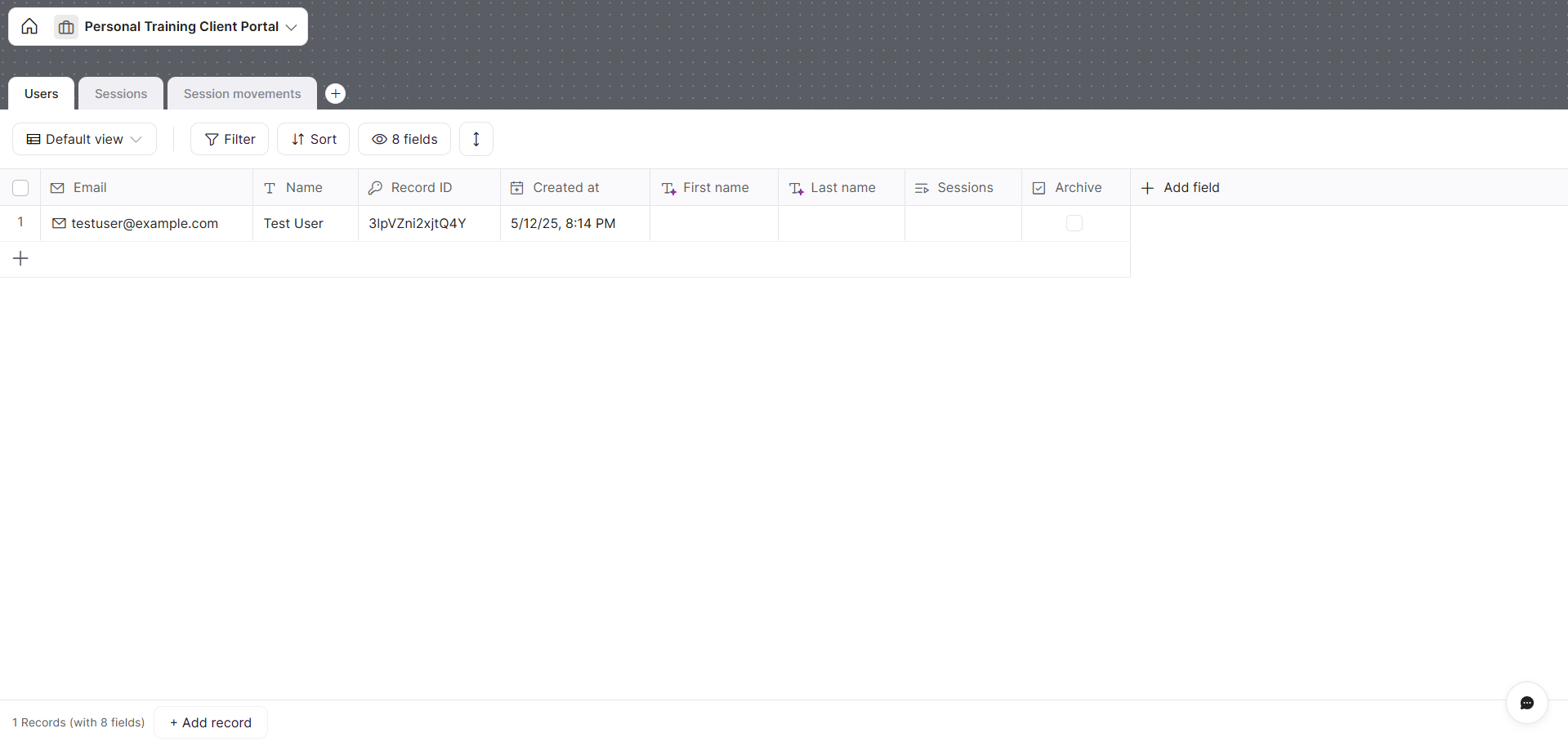
A Softr database with 3 tables (Users, Sessions, Session movements)
A Softr Database is a relational storage of one or multiple tables. One database contains one or multiple tables. Each table has fields (columns) of different types (text, number, formula, date, etc.) to store record data. Each table can contain multiple records (rows). Records can be linked across tables through Relations (e.g., linking a Contact to a Company).
Softr databases are one of the available data sources in Softr. Data sources are the “backend” of your Softr apps—the place where you store all the data for use in the app (with dynamic filters and different views applied as needed). Each app can use one or multiple databases (or data sources).
That’s all there is to know, at a fundamental level. The user interface of Softr Databases is similar to Airtable and other no-code tools that offer databases. See my guide to Notion databases here.
Softr Workflows

A Softr workflow to send Slack messages on specific events
A Softr Workflow is an automation that makes API calls and/or uses AI steps. It is a simple and minimal version of Zapier. As with any automation tool, Softr Workflows have triggers (what starts the automation) and actions (what happens next). They enable the manipulation of data via automations based on specific events that occur in Softr databases (e.g., record created/updated/deleted), apps (e.g., user added), or external tools (via webhooks and some third-party tool triggers). These triggers encompass a wide array of use cases, provided you understand what they are and how they fit into your workflow requirements.
Let’s look at a real example of a Softr Workflow you could build: when a user is added, send a Slack message to a channel. This can be useful for notifying yourself or your team of a new user or for keeping records of such events in a centralized location. To build this workflow, you would use a trigger (Softr apps > New User Added) and an action (Slack > Notify in a Slack channel), configuring them in the right-side panel. You then activate the Workflow, and it will run automatically. You can always check the history log (past runs) in the dedicated accessible via the top-left icon on the Workflows canvas.
That’s a simple example. You can certainly build much more complex Workflows with filters, multiple branches, looping, and as many actions as needed. The list of available actions in Softr Workflows seems ever-increasing, and there is also the “Call API” action that allows you to make an API request to ANY software tool that has a REST API.
One of the core value propositions of Softr Databases and Workflows is to reduce the number of software tools you need to build and scale your app. You can create your own ecosystem of backend and frontend in one place and launch in days instead of weeks (this, of course, depends on the complexity of the app and skills/energy available).
Enjoy building.
If you wish to work together to build professional apps, submit your interest here.
FAQs
How much does it cost?
It depends on your scale - see pricing here.
Is it scalable?
Yes for MVPs, internal tools, and many SMB portals. For bigger, spikier use cases, you’ll need thoughtful design and may hit plan limits. View the current plans and limits, as well as Databases and Workflows.
What scales today: Roughly 500k–1M records (by plan), 100–2,500+ users, and 10k–25k workflow actions per month, with monitoring and branching/loops built in. Read more: plans, Workflows, and monitoring.
Where it struggles: Very relation‑heavy tables with lots of lookups/rollups, giant unfiltered views, or lots of tiny workflow runs. How to avoid: design lean views and fields, batch work, and offload heavy steps via Call API. Learn more: related/lookups/rollups, Workflows.
Does it require maintenance?
Likely so, as any software system does. The degree of maintenance needed depends on the complexity of the app.
Is there any official guidance for migrating to Softr Databases?